Wednesday, May 14, 2014

CLIP LINKS

In Final Cut Pro X, any audio, video, or graphic element not in the Primary Storyline must be connected to Primary Storyline as a Connected Clip. This is great for moving around shots with attached titles, b-roll, sound effects, or green-screen backgrounds- no lassoing of elements like in Legacy FCP days.  Just pick the clip you want, and anything you’ve chosen to associate with that clip will follow along.

I would like to see the FCP X push the association between Primary Storyline clips and their Connected Clip siblings even further with a proposed feature I'll dub Clip Linking.

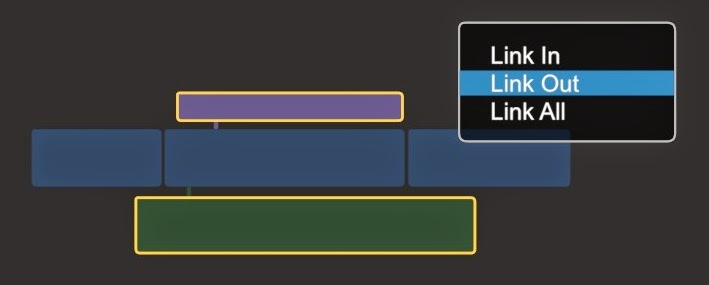
While a Primary Storyline’s position in the Project timeline affects Connected clips, any trimming you do to the Primary Storyline clip affects only itself.  In our example below, we’ll look at a Primary Storyline Clip with 2 connected clips: a Title clip ending at the same time as the Primary Storyline clip, and an audio clip that overhangs into the next shot.  


Now, if you shorten your Primary Storyline clip by -1:00, the Connected Clips duration won’t change, leaving your title and audio clip hanging over the following shot.  The next step would be to manually shorten each of your connected elements to match the timing change to the Primary Storyline clip.


This is not what we're looking for.  So. what are our options?

Unlike in some other NLE’s, in FCP X you cannot currently select and trim multiple clips at the same time.  And even if you could, you'd have to manually select them all.  What a pain!

In FCP X there is a function to select multiple clips and use CTRL+D to alter their length. This can be either as an absolute value [2:00], or as a differential [-24].  This works well, but  requires that you manual select all the clips you want to alter, AND that you know exactly how much you want to trim.  Still problematic.


Clip Linking would suppose that you set up associations between Primary Storyline clips and their Connected counterparts once, and then [like many tasks in FCP X] reap the benefits on repeated changes.

To do this, you would select the connected clips you want to add the behaviour to. 


A contextual menu would pop up asking you how you'd like the clips linked.  While we'll just look at Link Out, there could be options for Link In and Link All, depending on how you want the Connected Clips to behave.

Now let's look at our -1:00 trim edit again.


While only selecting and trimming the Primary Storyline clip, FCP X now assumes our Connect clip's edit Out point will mirror any trim, roll, or extend/shorten of the Primary Storyline clip.

To make isolated changes to the connected elements; say if you wanted to extend the bleed of the audio clip over the next shot- trimming that one clip doesn't filter back to the Primary, or any other connected clips.

Again, while setting up these Links takes a second for each link, I think it would save tones of clicking over the course of an edit.

What do you think?

Tuesday, May 13, 2014

ROLES

When Final Cut Pro X was first released in June of 2011, one of the biggest changes in philosophy was the abandonment of traditional Tracks.  Today we’re going to take a closer look at that decision; why it was made, what benefits it poses, and how further development of FCP X may quell some of that criticism.


TRACKS ARE A MEANS TO AN END, AND NOT AN END UNTO THEMSELVES

Track are, at their very core, an organizational tool.  A tool for organizing audio and video information visually in a way that makes locating it easier in complex projects.  In the case of audio, tracks are also used to group audio elements for the purpose of mixing and effects.

A Track is really just a folder of audio or video, laid out across a sequence of time.

But a Track is also a “dumb” organizational element.  Dialogue is on Tracks 1 and 2 simply because that’s where you the editor choose to put it.  But you might only need 1 Dialogue Track for a simple video, or you might need 10 Dialogue Tracks for a large scene involving lots of mics and many characters.  It’s completely arbitrary. 10 different editors are going to organize their audio/video Tracks 10 different ways.

Organization in Tracks is especially important in a collaborative workflow; where audio is passed off from editorial to post audio.  The editor always needs to supply support documentation, outlining what kind of audio is on what tracks.

Tracks in and of themselves aren’t important, they are simply a means to an end. The ability to organize information both in the timeline, the ability to group elements for common effects, and for the purpose of passing that work on cleanly to other departments- THAT’S the goal.  


TRACKS WON’T WORK IN X

The two big changes in the core philosophy of editing in FCP X were Connected Clips, and the Magnetic Timeline.   The key idea here was to set up a relationship-based methodology to content.  Elements in the Primary Storyline are considered the backbone of the cut, and any additional audio or video that is added is understood to be subservient to that “Primary” content.  In the last year of working with FCP X, I find this works remarkably well, especially for audio.  If you connect the SFX of a gunshot to a video clip in the Primary Storyline; once that relationship is established, it’s fixed.  Regardless of whether you trim, roll, slip, or even change the order of shots in the timeline.  

Where things start to get tricky, is when in the process of editing the Primary Storyline, connected clips come into conflict.  In legacy Final Cut Pro, if you trimmed a clip, and then closed the gap, you would either get a warning that the edit wasn't allowed due to a clip conflict, or overlapping elements would just be overwritten.  This is obviously not what you want, and it meant that the editor could be forever jostling audio elements from one track to another as the edit was refined, in order to resolve audio or video clip conflicts and make sure that elements overlapped as intended, all while trying to maintain the organizational structure of the tracks.

In Final Cut Pro X, clip conflict is resolved by one audio/video element “bumping” the other up or down; the integrity of both elements is maintained regardless of what goes on in the Primary Storyline.  The compromise, obviously, is that the vertical hierarchy of Tracks becomes impossible to maintain.  If TRACK 1&2 are DIALOGUE, and TRACK 3&4 are MUSIC- if 3 Dialogue elements overlap then a new “Track” [FCP X refers to them as “Lanes”] is added, and any structure based on tracks becomes moot.


SEA OF GREEN

The biggest detriments to the visual organization of audio in the FCP X timeline,  is that all audio only comes in two colors- blue for audio components, and green for everything else.  Secondly, all audio elements naturally gravitate towards the Primary Storyline.  In a simple projects with some interview audio, a music track, and perhaps a few sound effects, this isn’t so bad.  But as you get into more complicated projects with dozens of lanes of audio with no obvious separation or way to distinguish your elements visually; the audio in the timeline becomes a sea of anonymous green clips.


Simple FCP X Project with audio elements uniform colour and intermixed.  What's what here?
CLICK TO ENLARGE

ENTER: THE ROLE

In September of 2011, Apple released their first update to Final Cut Pro X: 10.0.1.  The update brought with it a host of improvements including a brand new feature called Roles.

Roles was a new form of metadata added to media in an Event, explicitly tagging clips with an audio or video “media type”.  Pre-defined Video Roles included b-roll and titles, while Audio Roles included dialogue, music, and effects.  But Roles are completely customizable, with the ability to create new Roles (Ambience, Voice Over) or Sub Roles (Dialogue- Nick, Dialogue- Sally).

Roles imprints information onto media that in other NLEs must simply be assumed because of the track it sits on. 

As well, the addition of a Role tab in the Timeline Index pane, allowed you to selectively turn on and off Roles, or highlight all media of a certain Role, in the project timeline.  Roles also allowed the user to export stems of Roles in multi-channel audio exports.  Finally, via the 3rd party program X2Pro, Roles could be exported via AAF for use in ProTools.  The added benefit being that Roles name information was automatically transferred to the DAW, eliminating the need for track reference sheets.

As intriguing and seemingly powerful Roles are, it still didn’t solve a key problem in FCP X, a visual organization to material in the timeline.


BUT WAIT!  APPLE ALREADY SOLVED THIS PROBLEM

When FCP X was first released, I remember reading a particularly maddening “review” of the software from a site I shan’t name.  The author went on about how he spent nearly an hour trying to figure out how to make Bins in FCP X, little realizing (and of course, not doing the research before writing his stupid article) that a new methodology had been implemented for organizing media: Keywords.

Keywords imprinted metadata onto media in an Event, allowing for an active organization of elements based on tagging media with single or multiple Keywords.  It’s a very fluid and extremely powerful way to organize media, especially with the addition of Smart Collections, which allow you to set up a “Smart Bin” which is made of any media (or selections of media) which satisfy a user-defined set of not only Keywords, but any combination of metadata criteria.

This is opposed to other NLEs, where you create a static Bin [really just a folder] which you drop clips into.  Lets say you create a bin called “canoes”.  The material that’s in it is about canoes only because you put it in that Bin, and not because the media explicitly demands it.  Bins are dumb.  Keyword Collections are smart.  Smart Collections are REALLY smart.

So if we take what I proposed earlier about a Track being essentially “Bin across time”, then we start to see a really interesting correlation:

Bins are to Keywords, as Tracks are to Roles.

So if we take this concept to it’s literal conclusion, then what the Project Timeline in FCP X is really missing are “Role Collections”.


ROLE COLLECTIONS

With Roles, organizational information has already been attached to the media, that information just needs to be used to sort the media in the Project Timeline.  By grouping Role elements together, and giving them a colour coding system, gives the timeline focus.

So if we imagine an empty timeline, and we add a new clip... lets say Voice Over- automatically a Voice Over Role Collection is created.  As you add more media, more Role Collections are added [Music, Dialogue, Sound Effect, Ambience].  And if you add media for which there already is a Collection, it’s automatically added to the appropriate place.

Same Project from above with Roles now separated vertically, and colour coding to allow easy identification
of video [Titles,
Graphics, Video] and audio [Voice Over, Music, and Sound Effects] elements.
CLICK TO ENLARGE


Much cleaner, yes?

A couple of notes about this proposed organizational model.

Some have tried to use Compound Clips in FCP X as a way to faux Tracks.  The problem is that a Compound Clip breaks individual clips connections to the Primary Storyline- this is obviously not what you want if the cut is still evolving.  With Role Collections, these links would be maintained.

Tracks are always one audio layer deep.  While Role Collections could have as many stacked Lanes as required based on the number of overlapping media clips.  So, for example, a “Dialogue” Role Collection could be 1, 2, or 10 Lanes high; depending on the number of overlapping clips.  However, if you need more organizational granularity, you can (via SubRoles) create as many sub Roles for Dialogue as you see fit, and in the end each one has it's own Lane.

Another nice addition here would be expanded Role controls in the Timeline Index, allowing the user to alter the order of Roles [much like how you can re-order your camera angles in a Multi-cam clip].  Additional controls could be for selectable Role colour, and icons.

With complex Timelines, vertical space is always at a premium.  The ability to collapse and expand Roll Collections into single-Lanes [much like LogicPro X’s Stack Tracks] would also be a big help.  Another idea would be to “solo” a Roll [like you can solo layers in Motion], this would allow the editor to focus on one specific Role element easily, with the option to hear it on its own, OR in the context of the entire mix.


ADDITIONAL BENEFITS

With Role Collections, we now have an organizing container which can now be assigned for more complex Mixing [should Apple decide to bring Bus-based mixing to Final Cut Pro X].  At the very least, it would allow for audio effects to be added to a whole group of clips via their Role Collection, and global volume adjustments to be made.

Seeing what a boon metadata-based organization has been in the Event Browser makes me hopeful that a more extensive implementation of Roles will result in a similar advances in timeline workflow.

Fingers crossed!


Thursday, January 24, 2013

Final Cut Pro X 2013, PART 2


LAST TIME we discussed the progress FCPX made in 2012.  5 updates in 12 months, Pro feature focused, and on an aggressive development schedule.

In this article, we’ll look forward and try to suss out what Apple’s Final Cut Pro X development plan may be for 2013.

I’d like to be crystal clear in my projections.  I have no insider info, and am basing everything you’ll read below on the analysis of past action and what I think is some logical supposition.  Apple can be a mercurial company, but it isn’t immune patterns if you look closely.  Looking at FCPX’s update schedule up to now does give us a general guide as to what we might expect this year, should things continue on their present course.  But as the release of FCPX itself proves, anything can happen!

Confused?  Great- lets go!


WHAT’S A 10.1?

The conversation about Final Cut this year is very likely to centre around whether FPCX will move from 10.0.X updates to to 10.1.  But what exactly does that mean for the software and the user?

In the 10 years of legacy Final Cut, development centered around major updates on a roughly bi-annual cycle.  In the years between these banner releases, updates from Apple added little in terms of new features, and instead were focused on stability, bug fixes, performance enhancements, and support for new hardware and footage formats.

With the release of Final Cut Pro X, Apple made a point of saying that releasing FCPX via the Mac appStore would allow for more frequent updates and rapid development than in the past.  The fact that we’ve seen 3 major feature updates, plus 4 minor updates in the last 2 years seems to bear this out.  And yet here we still are at 10.0.7 as of January 24th.

So how will apple define the next major release of Final Cut Pro X?  

Thankfully, we don’t have to look very far for an answer...

Apple seems to REALLY likes the letter “X”.  Perhaps the only letter used more prominently by the company marketing is the now omnipresent “i” prefix.

On the Mac, Apple has been slowly working it’s way thru point updates to OSX for over a decade.  Each major successive operating system release uses a new big-cat name and an incremental decimal place to describe it: from 10.1 “Puma” to 10.8 “Mountain Lion”.  They seem to be pretty happy with how that worked out for them, ‘cause it looks like that’s what Apple is doing with Final Cut Pro X as well.  Where we used to measure Final Cut releases with whole numbers (5 to 6 to 7), all indications are we can now expect to see the same iterative decimal update numerology for Final Cut Pro.  And if the rumors are true, Apple’s Pro audio tool Logic, and Photo editing tool Aperture will also be moving to the “X” name/number with their next major releases.  It’s sort of curious, as it seems pretty inevitable that we’re coming to the end of “OSX” this year as Apple releases OSX 10.9.

So, the next major version of Final Cut won’t be FInal Cut Pro 11, or Final Cut Pro XI.  Instead, Final Cut Pro is likely to be “X” for some time to come, with major updates to the software being identified as 10.1, 10.2, 10.3 and so on...  This would certainly seem to mesh with Apple’s PR at launch in 2011 that FCPX has a, “10 year development plan” for the software.

The other thing to consider is that because there are only 9 10.0.X places for updates, it might hint that a rapid, perhaps even annual major update cycle could be the eventual goal.  That is, unless Apple alters their update naming system to include another decimal place, making 10.0.7.1 possible, OR if they allow themselves to go to numbers like 10.0.11.  Either of these is possible- 7toX from Intelligent Assistance is currently at version 1.0.17. 


SO... WHAT MERITS 10.1?

Looking back at PART 1, it’s clear that the FCPX development team’s goal for the past 2 years has been the reinstatement (and improvement) of Pro Features that were either omitted or incomplete at FCPX’s launch in June of 2011.  While I think there are still several holes in functionality left to fill, the list is MUCH shorter now than it was even 6 months ago.  

Last year I found it hard to grasp that we might be ready for a 10.1 software update; today I find it hard to imagine that the FCPX dev team would be able to find another year’s worth of updates WITHOUT moving to a new major version number.  There simply aren’t that many areas of Legacy functionality left to be reintegrated.

That leaves us with NEW territory.  New features and functionality that would have been new to Final Cut even if FCPX was FCP8.

Features like advanced bus-based mixing, auto-transcription of dialogue on import, person identification like in iPhoto, or advanced collaborative editing functionality (which was sold separately as Final Cut Server but was never part of the Studio itself).

As we come to the end of this first chapter of Final Cut Pro X, with many (but not all) of the software’s initial deficiencies addressed, Apple will need to to present a compelling set upgrades to drive existing users of FCPX to update to 10.1, and perhaps those legacy users still on FCP7 to finally give the software a shot.

Which brings us to...


FREE, PAID, OR UPGRADE?

For both of the major feature updates in 2012 [10.0.3 and 10.0.6], there was some speculation that each one would be a paid upgrade.  Personally, I never put much stock in those opinions.  Since the features that had been pre-announced were reintegrating legacy functionality,  I found it hard to believe that Apple would ask the small and beleaguered group of individuals who’d actually taken a chance on the software to pay again for features that the software should arguably have had in the first place.

But if a major 10.1 release is indeed on the way, has the situation changed?  Let’s look at the three possibilities:

OPTION 1, Apple could release 10.1 as another FREE update.  Popular opinion is still heavily against FCPX in most professional circles.  And while many legacy users downloaded FCPX, it’s likely that a majority of those download aren’t being actively used.  Offering this first major update to Final Cut Pro X for nothing could do nothing but garner good will with not only those already using it, but those who’ve already got it on their systems and have been waiting for it to develop to give it a chance, especially if the new 10.1 features are particularly compelling.  Apple could certainly use a snowball of good press to counter the current sentiment in the industry against the software.

But on the flip side, Apple is a business.  Early adopters had ample opportunity to get a refund in the Summer of 2011.  And Since 10.0.1, Apple has offered a 30 day free trial for those wishing to test-drive FCPX.  So from their perspective, those who decided to hold onto the software either decided to use it, or decided it wasn’t worth the trouble to seek a refund.  In either case, Apple may not feel motivated to give away a substantial update to 2 year old software.  I’m sure any “not free” option is going to ruffle some people’s feathers, but what can Apple do?

OPTION 2 is that Apple could release the software at another full $299.  Considering how cheap the software was to begin with, Apple may feel that $300 for professional software every 2 years is a perfectly reasonable price to pay if you’re using it to make a living.  I’d like to think that anyone being paid for editing would make the price of the software back in AT MOST a day of work, much less if you’re skilled and in demand.  When Final Cut Studio cost $1,299, the cost to upgrade was usually about $300-$400.  But at $299, the initial cost is so low that upgrade pricing seem almost pointless.  And as it turns out, impossible at the present time.  Which brings us to-

OPTION 3, an upgrade price.  The real problem with the idea of a... say, $100 upgrade fee for 10.1 is that... there’s no facility for paid upgrades in the current appStore model.  Developers must either give the updates away for free, or put them up on the store as entirely new apps, with no way to set different price points for new vs existing users.  Developers have been asking for this for years, but Apple has as of yet made no motions to make it happen.   There are many theories as to why they haven’t done this, but the bottom line is that it’s not there.

While there’s nothing to say they could not add this in the future, the most likely time for them to announce that would be at WWDC in June as part of the annual iOS/OSX developer preview.  Even then, it probably wouldn’t actually be up and running until OSX 10.9 was released sometime in the fall.  So IF Apple decides to add this option to the Mac appStore AND a 10.1 update doesn’t come until the fall, then perhaps this could be a possibility.  But for now it’s a non-starter.

Which leads us to the most enticing question...


WHAT’S NEXT?  10.0.8?  10.1? FCP8?

Final Cut Pro 8... hahahaha... No.  And if that’s really what you’re hanging on FCP7 waiting for I encourage you to seek out one of the other NLE options on the market.

Beyond that, what might 2013 hold for Final Cut Pro X?

If we look at it purely from a past FCPX update perspective, using the update cycle data I’ve listed above, then we’d be due for 10.0.8 to drop somewhere around February 19th, and a 10.0.9 in April somewhere around NAB.

With only one exception, Apple have been following a FEATURE-MAINTENANCE-FEATURE-MAINTENANCE schedule.  So it should follow that 10.0.8 would be a feature release, Right?  However, we’ve already seen one change in Apple’s behavior that might hurt this assumption- no upcoming features have been pre-announced for the next update.  They did this for both 10.0.3 and 10.0.6, as well as giving a vague window for release.  Why this change?  Perhaps Apple don’t feel they need to pre-announce features anymore- that all the MAJOR holes have been filled, and that the skepticism around whether FCPX is interested in integrating pro features is past.  Another possibility is that we’re getting 2 maintenance releases in a row [like 10.0.4 and 10.0.5] and in that case maybe we’ll see a preview of new features when 10.0.8 is released, pointing to a substantial 10.0.9 release.  Finally, it might be because the features in the next release go beyond legacy functionality- and so Apple isn’t going to reveal them.

The only other solid data point we can look at is the history of legacy Final Cut Pro.  While I don’t think we can take anything that happened with legacy Final Cut as proof positive of what will happen going forward, until they break with a pattern conclusively, it holds some relevance.

Final Cut Pro 1 • NAB 1999
Final Cut Pro 2 • MAR 2001
Final Cut Pro 3 • DEC 2001
Final Cut Pro 4 • NAB 2003
Final Cut Pro 4.5 • NAB 2004
Final Cut Pro 5 • NAB 2005
Final Cut Pro 6 • NAB 2007
Final Cut Pro 7 • JUL 2009
Final Cut Pro X • NAB 2011

*source Wikipedia


Out of the 8 releases of legacy FCP between 1999 and 2009, 5 of those were previewed at NAB in their respective years.  The ones that weren’t were FCP2, FCP3, and FCP7.  While Final Cut Studio 3 was considered by many to be a fairly minor update to the suite; FCP 2 and 3 were big improvements in the early days of the software, so I’m not sure why they gave NAB a pass.  But I think it’s safe to say that the majority of the time, Apple has demoed new versions of Final Cut Pro at NAB, including Final Cut Pro X in 2011.

The other pattern here is that Final Cut Pro has typically seen major updates on a roughly 2 year cycle.  Final Cut Pro 2 & 3 were released in the same year, and Final Cut Pro 4.5 [or Final Cut Pro HD] was a iterate step up in the software before all of Apple’s video production tools were wrapped together into FInal Cut Studio.

And that’s really all the data we have to work with- anything else is pure speculation.  Which brings us finally to...


SPECULATION

I’m personally beginning to feel we’ve reached a pivot point in the development of Final Cut Pro X.

While there are some great lists like Richard Taylor’s “Top 90 Requests for Final Cut Pro X” that describe areas for improvement in workflow and finessing UI, the BIG requests from 10.0 are mostly gone, unless you count tracks and a non-magnetic timeline [in which case I think you’re out of luck].

Apple could easily spend a year implementing most of the requests on a list like that, and while I think almost everything on that list is worth doing, I don’t see the FCPX dev team sitting back and and just massaging the existing feature-set.

Apple needs to keep pushing forward- they still have to convince people that the rethinking of editing that’s at the core of FCPX is was worthwhile, and even more, that the time that has to go into learning FCPX is a worthwhile investment for companies still clinging to their copies of Final Cut Pro 7.

Like last year, I think we’ll see at least two major revisions to the Final Cut Pro X this year.  

In the immediate term, I see another substantial feature upgrade with either 10.0.8 or [more likely] 10.0.9, between now and April.  

Whether it’s a 10.0.X or 10.1 preview, I really hope we see Randy Ubillos back at NAB this year.  While I think the harsh view of FCPX has softened to some extent, I think the FCPX dev team needs to show they’re not deterred by the negativity of the past 2 years, and come out swinging again.  Everything added back to FCPX since 10.0 has been a substantive improvement over it’s legacy predecessor.  They just need to keep going.

The back half of the year is much foggier.  As I stated earlier, while I could definitely see a 10.1 upgrade this year, there are issues around the MacAppStore that have me wondering if it’s really in the cards.  There’s the aforementioned potential issue with upgrade pricing.  There’s also the fact that at some point FCPX is going to need to be sandboxed like all other appsStore apps.  In it’s current incarnation it’s immune to those rules, but my understanding is that any new version will have to abide by those sandboxing policies.  It could be problematic for the Project/Event structure, OR for potential round-tripping with other apps like Motion or Logic.  So if 10.1 does happen this year, I think it would have to be in the fall to make any sense.  But that does leave me confounded as to what Apple will do with the update naming structure after 10.0.9, which would presumably drop by the Summer.  That still leaves half a year of development with no where to go numerically unless Apple goes to 10.0.10 and beyond.

As for what zones of development we’ll see this year- the two large ones that I see at the forefront are AUDIO and COLLABORATIVE WORKFLOWS.  If you held a gun to my head, I’d say that AUDIO will get attention first.

In terms of audio, ROLES is a half-implemented solution at this point- and finishing the job will have positive implications for audio mixing, project timeline layout, and AAF/OMF export.  FCPX’s trackless timeline is still seen as a deficiency that this stage- and making that concept acceptable to people is the biggest hurdle they need to overcome right now.  

COLLABORATIVE WORKFLOWS is a very specialized problem.  Apple had years of Final Cut Server experience to get a read on what people really wanted out of that product- so I have high hopes that when that functionality returns it will be both more powerful and accessible.

Other areas I’d like to see tackled are PROJECT VERSIONING that goes beyond project duplication, a more substantive and bullet-proof BACKUP VAULT.  KEYFRAMING also needs to be overhauled, and of course better ROUND-TRIPPING WITH MOTION [which will hopefully also see a substantive update this year as well].

The final area that needs attention this year is FCPXs image.  And while continuous feature improvements will help the software’s reputation- the bigger issue I see is a purely PR one.  Some people have gone cold on Apple.  There are numerous reasons for this, some valid, some silly.  But they’re there, make no mistake.

FCPX might have been the most mismanaged launch in Apple’s history.  Positioned and presented properly- FCPX could have been an enticing future platform that Final Cut editors could be excited about and engaged with.  As it was, a terrible example is alienating your user base.

But what’s done is done and it’s time to move forward.  And to do that Apple need to make presenting to people and demoing the software a priority, anywhere they can, as often as they can.  There are so many misconceptions about what FCPX can and can’t do at this stage, and unless Apple gets out in front of this problem, these perceptions are going to linger LONG after they’ve solved them in the software itself.  Apple needs to engage those who are using it- they’re ambassadors for your product.  And finally Apple needs to address the MacPro issue- high end users need to know where Apple stands in this space.  Thanks to Tim Cook, we already know something is coming in 2013.  Don’t blow it!


NEXT:  We’ll take an in-depth look at how I hope to see Roles evolve in 2013.

Monday, December 31, 2012

Final Cut Pro X 2013, PART 1


FCPX in 2012 [10.0.3-10.0.7]

Over the next several weeks we’ll be taking a look at where Apple’s Final Cut Pro X might be headed over the 2013 calendar year.  But first I thought it might be worth taking a look back at the past year and see just how far we’ve come before getting to where we might be going...

This will not be a feature by feature review.  If you’re looking for detailed notes on each release, I encourage you to seek out Apple’s own release notes.  Here I’m more interested in what these updates mean generally for the software’s future development.

When 2012 started there was still tons of doubt about FCPXs focus.  We had seen one major [10.0.1] and one minor [10.0.2] update in 2011, and although some important stability and usability issues were addressed in those updates, it had done little to diminish the long list of professional features that were indeed still missing from the application.  So was FCPX really meant for “hobbyists” or “Prosumers”?  Or was Apple’s ultimate goal indeed to eventually fill the same market-space as FCP7?

A NEW, OPEN APPLE [by Apple standards anyway...]

Released on November 16th 2011, FCPX 10.0.2 was in itself a minor maintenance release.  The bigger story was a list of pre-announced features appearing on the “What’s New” page of Apple’s Final Cut Pro X website.  Beyond the importance of the features themselves [Multicam & Broadcast Monitoring], Apple preemptively discussing any unreleased future product was a break from their modus operandi.  Shortly after FPX’s original release in June, in the firestorm of disappointment and burning hatred, Apple had done a Q&A in the addressing specific questions about whether Apple intended certain Pro features to return.

http://www.macstories.net/news/apple-responds-to-final-cut-pro-x-criticism-with-another-qa/

The 10.0.2 pre-announcements definitely seemed to indicate an intention to continue a more open dialogue with users- attempting to telegraph [as clearly as Apple ever would] that Pro features would would indeed return to FCPX, and in the near term.  Then on April 10th, just before NAB2012, Apple released FCPX 10.0.4 and this time invited members of the press to discuss upcoming features bound for the software “In 2012”.  The highlighted features again focused entirely on Pro-oriented requests, including RED and MXF support, Multichannel Audio Editing, and Dual Viewers.

This peak into FCPXs future development was a great start, I can’t help but think Apple needs do more to sooth the choppy waters FCPXs introduction caused.  Even if the platform matures as those of us who use it think that it will, the wariness about Apple’s commitment to the Pro user will likely continue to dog the software long after it has technically left those barriers behind.  

But Apple’s new PR push wasn’t without it’s stumbles...  In July, the LACPUG announced that Apple would be doing a presentation around the 1 year anniversary of the software’s release.  The wording of Apple’s PR blurb was vague, and the rumor mill went into overdrive- from attendees thinking they would see a preview of new features, to some even speculating that 10.1 might be released shortly thereafter.  As it turns out, it was a dog and pony show of all the features that had been re-implemented into the software since 10.0.  Reports on twitter were that the presentation did not go over well with many in attendance.  It was a miscommunication of messaging, but it’s exactly the type of confusion Apple needs to avoid.  

Going forward into 2013, I doubt we’ll see these feature pre-announcements continue for much longer.  As long as FCPX is re-integrating legacy functionality- they’re certainly not letting the cat out of the bag on anything by teasing us with the immediate roadmap, but once those holes have been filled, I’d bet very heavily against seeing Apple giving us lists of “next generation” features that could technically give it a competitive advantage.  That’s just good sense.


RAPID DEVELOPMENT [by anyone’s standard], FOCUSED ON PRO FEATURES

The features pre-announced with 10.0.2 were earmarked for “Early 2012”.  The general consensus was that this would mean 1st quarter of 2012... or more likely around NAB in April.  But to the surprise of just about everyone 10.0.3 was indeed released VERY early in 2012, on January 31st.  This in my mind is one of the big FCPX stories for 2012; the rapid and regular update cycle that Apple has been able to maintain throughout the year.  FCPX is still lagging behind from a feature perspective, but if they keep this pace up, it won’t be for long.

FCPX received 2 major feature updates and 3 maintenance updates in 2012.  If anything, it’s likely the FCPX development team is BEHIND on it’s own goals for the year.  On June 11th at Apple’s Worldwide Developers Conference, the company released it’s first Retina Mac, the 15” MacBookPro with Retina Display.  Along with it came Retina updates to several applications, including Aperture and Final Cut ProX [10.0.5].  It’s generally understood that Apple’s development teams work in tight silos, with one group knowing little to nothing about what another is doing until absolutely necessary.  So it’s quite probable that the FCPX team received little notice about the impending hardware update, and when they were informed that they’d need to have a Retina update ready for WWDC, had to push back the schedule for it’s next major release until they could get 10.0.5 out the door.  If they hadn’t had Retina support sprung on them, it seems possible we could have seen the 10.0.6 features in 10.0.5, around the 1 year anniversary of FCPX.

If you look at the release schedule thus far [see chart below], 10.0.6‘s 134 days is certainly the anomaly, with the average update cycle to that point being about 10 weeks [70 days].

FCPX RELEASE SCHEDULE [days between updates]


Keeping that in mind, the FCPX development team was STILL able to get 10.0.6 out on October 23rd, well clear of the “2012” deadline they announced at NAB.  AND they were also able to release an end-of-year maintenance update on December 6th [10.0.7].

In our next article we’ll examine more closely whether this release pattern will continue into 2013, or if we’re nearing a pivot point in the development of the software.


FORGET WHAT YOU THINK YOU KNOW ABOUT PRODUCT FOCUS

It used to be that Apple kept a very tight reign on product focus.  If Apple had a product to launch, they would put all their marketing effort behind that one product. Longtime Apple users will remember that even Final Cut Pro releases would get feature placement on Apple’s website not so long ago.  Of course, this was when Apple’s stable of products was much smaller.  2 laptops and 2 desktops, iPods, iLife and iWork suites, and their Pro software: FCP and Logic.

All thru this fall, as speculators attempted to estimate the release date for 10.0.6 [myself included], people would always black out ranges around Apple events, especially consumer focused ones.  The thinking being that Apple would want to keep it’s marketing message focused on whatever devices it was announcing that day.  But the day 10.0.6 was released in October, was the day of an event that introduced the iPad mini, and 4th generation iPad, the newly designed iMac, and a 13” variant of the Retina MacBook Pro.  Clearly, Apple isn’t worried about FCPX being released and muddying the PR waters for their other products.  

This is a positive in that it means that FCPX is free to follow along on it’s own development path unaffected by how Apple schedules it’s Mac and iOS products.  That’s not to say that they can’t pursue synergy where it makes sense.  This is why we saw the Retina MacBookPro and a Retina update to FCPX on the same day.  But FCPX  development won’t be slave to unrelated products.  That’s good news.


RE-THINK, NOT JUST REPLICATE

One thing that has been obvious from the start of FCPX is that Apple’s intention wasn’t just to update, but to rethink every aspect of the software- even if some might not want them to.  Every feature that has been brought back to FCPX in 2012 has been fundamentally rethought to make it more intuitive, more useful, and more powerful.  Multicam in 10.0.3 combined with the new Multichannel Audio Editing tools in 10.0.6 deliver an amazing step up from it’s legacy counterpart.  RED support has improved drastically, bringing it in-line with the best offerings from competitors.  Paste Attributes does the same job with more granularity and control.

And while it remains at present an incomplete solution, I think Roles holds great promise for the future; as a foundation for project organization, audio mixing, and project versioning [more to come on that later in this series].


A LONG ROAD BOTH AHEAD AND BEHIND

While the application has come a long way since 2012 began, as we close out the year, there remains a lot of skepticism about FCPX.  While it seems to be finding a lot of friends in one-man and small shops, it’s penetration into more established markets remains a novelty at best.  Let’s make no mistake- FCPX’s deficiencies are very real for many workflows.  But each update comes with new stories of those decided to take the plunge and find advantages in FCPX’s new philosophies and concepts.

Full Disclosure: though I was playing with the software almost every day since it was released, I didn’t move the majority of my work to FCPX until the 10.0.4 release in April, when Broadcast Monitoring came out of Beta.  At this point I probably only open FCP7 once a week, to do a quick tweak to a legacy project, or for a client that needs FCP7 backup files.  But happily those are the exception these days.


NEXT TIME:

In Part 2 of this series will look ahead to 2013 and discuss what form this years updates might take; and if, how, and when a 10.1 update is in the cards.

Sunday, March 11, 2012

DON'T HOLD YOUR BREATH WAITING TV APPS [hint, you'll die]

The iPad is naturally generating a lot of buzz around the internet in the last week.  Most of it's been pretty positive, with the standard regiment of malcontents deciding it was "disappointing" or "underwhelming" for whatever reason.  And that's the point... I don't think I've heard anyone adequately explain what it was they were expecting that they didn't get.  There was just no outlandish surprises.  Oh, well...

Announced alongside the iPad was a refreshed TV, bringing 1080p support and a new UI-  it was nothing groundbreaking, but anyone that was expecting something more during an iPad event was deluding themselves.  Many argued that Apple wouldn't announce another product during the event, but the more I thought about the way Apple has been positioning AirPlay connectivity since iOS5 came out, it really made sense with the iPad's 2x resolution to both start delivering iTunes movies and TV shows at 1080p resolution, as well as release an TV which could push AirPlay from your iPad at the best possible resolution.

Here again we had lots of complaints, on one hand you have people surprised/disappointed that Apple's 1080p isn't BluRay quality.

Well... DUH!

But the other complaint is one we've hit twice in a row now- TV appStore.  I have to admit that when this rumour cropped up before the announcement of the TV2, I was onboard.  Heck, I was even planning with a friend of mine to start a weekly TV podcast.  But it was not to be then, and there was absolutely no mention of it last week.

I've thought about it a bit this week and I've come to a conclusion- it ain't gonna happen.  Sorry.  Nope.

Thinking about it in retrospect, it was clear when Apple launched the TV2 at Macworld in 2008, and the refresh at last week's iPad event sealed the deal.

Why am I so sure?

It comes down to two things-  First, storage.

When Apple launched the TV2, they removed the bulk of the internal storage from the original version.  Gone were the 40 or 160GB internal drives that had to be synched with a computer on your local home network.  In their place in the tiny shell of the TV2 was 8GB of flash memory.  Enough storage to buffer streaming of a movie or two, and that's it.  We haven't heard how much internal flash memory lives in the new TV, but I guarantee you it's not much more than 8GB.

If Apple were to launch an appStore for the TV, where does the user store all these apps?  A couple of good sized games or applications, and your going to be running out of space.  Especially if you consider the TV MUST keep a certain amount of that flash memory available for media streaming.  There's just no room to be downloading any reasonable amount of apps in the TVs current form factor.

And the second nail in the coffin?  The processor.

Apple updated the TV with an A5 processor.   But it wasn't the dual-core A5X with quad-core GPU that Apple put into the new iPad.  Heck, it wasn't even the dual-core A5 they put into last fall's iPhone4S.  It was an all new single-core A5, beefed up specifically to give the TV enough horsepower to decode h.264 using the High or Main profile [thanks, ars technica] at up to 25Mbps.  So what does this tell us?  If Apple had any intention to giving the TV access to an appStore, saddling it with this single-core A5 chip makes no sense at all.  It would make it already less powerful than the iPhone4, perhaps even less powerful than the 2009 iPhone3GS at some tasks.  No, this device has been specially tuned to do one thing and one thing well- media streaming.

And really, what's Apple's motivation for putting an appStore on a device that costs $99, and potentially poaching sales of vastly more profitable iPhones, iPodTouches, and iPads.  There is none.

So what's the deal?  Well, it all comes back to AirPlay.  Apple sees the TV as the widget to get your stuff from all your Apple gear onto your big screen.  That's it.  It's that simple.  If you want apps on your TV, then you can do that... by pushing them from your iOS device, and later this year with your Mac running Mountain Lion.  By doing this, Apple eliminates all the interface problems that would have come from a straight up appStore for TV.  No new multi-touch remote, no alternate versions of apps for TVs interface.  Just all the apps on your Mac or iOS device... on your TV.

So where does this leave us?  Well, I do think we'll see customized functionality for TV.  Apple is already showing us what this will look like with the new interface.  But it won't be apps we're downloading, but CHANNELS, much like the VIMEO or MLB or NETFLIX apps that come preinstalled on the new TV now.  Apps like this are very small, basically shells for displaying content streamed from the net.  So the storage constraints won't be an issue.  And it leaves the TV processor to do what it does best, stream media.

So if you have no interest in sports, you can delete all those apps from the interface, and hopefully [should networks finally come to their senses] be able to download HBOGO, or HULU, or CBS, or NICKELODEON or whatever.  Essentially creating your own cable box with only the channels you're interested in subscribing to.


So, sorry, no TV appStore.

Saturday, March 10, 2012

GOING FORWARD - FCPX 10.0.4

It seems like FCPX 10.0.3 just came out, bringing with it a host of new or renewed features including multicam, media relinking, layered photoshop file support, batch file renaming, and broadcast monitoring [Beta].  As well, it brought improvements to XML, colour correction, choma keying, and overall performance and stability.

But the biggest change, I think, might be the attitude towards the software.  I’ve seen lots of articles from people openly hostile towards the original release who’ve been converted, or at the very least their stance has softened.  Scott Simmons, who I’ve had several back and forths with on Twitter, wrote a great piece for Studio Daily about the current state of FCPX


The key point here in Scott’s article,

"...part of the argument against FCPX was its lack of certain core functions that editors have always relied on. Now that many of them are back the questions to ask about moving to FCPX is less about editing features and more about editing philosophy."

Quoth the internet, "THIS".  The reason I've been so frustrated to understand much of the reaction to FCPX, is that it seems most people's attitude was that ANY change to the way things are currently done means that it was no longer "Pro".


Well, to quote the ever-readable Philip Hodgetts of Intelligent Assistance,
"The first problem with making major improvements is that it will involve change and we know that no one likes change: they want things to get better but never change!"


I'm not going to go down this path too far, but to conclude this point, I've hear many people complain since the launch of FCPX that Apple is trying to "tell them now to edit".  Well, sure... they're proposing ideas that differ from the way things are currently done.  But as someone who's been editing since the first NLEs surfaced, I have to say, I don't remember being asked how I wanted to edit back then either!

In the end, there are two ways to look at Apple as a company investing into FCPX:

The first is that Apple is a company where editing software contributes basically nothing to their bottom line; their livelihood doesn’t depend on it’s success, so why should we expect them to take it seriously.
The second, is that Apple is a company where editing software contributes basically nothing to their bottom line; their livelihood doesn’t depend on it’s success, so they have the freedom to take chances that other companies that live or die on their software’s success cannot.
AVID isn’t going to do anything to rock the boat with their core user base.  Those users have their rut and dammit don’t screw with my interface or command keys!  This gives AVID very little room to maneuver in terms of innovating.  All they can do is make “the faster horse”.
Apple is willing to throw away core ideas and start over- and that’s where real innovation begins.


Wait... wasn’t this article about 10.0.4?
Ok.  Thanks for letting me vent...
Let’s take a look at Apple’s FCPX release schedule since the product first launched, with days between each update listed after-
10.0.0 - Jun 21, 2011
10.0.1 - Sep 20, 2011  [91 DAYS]
10.0.2 - Nov 16, 2011  [57 DAYS]
10.0.3 - Jan 31, 2012  [76 DAYS]
The smartest way to predict what Apple is going to do is look for patterns in their process.  We don’t have a lot of data to work with yet, but so far the update release cycle has been 10.0.1 [Feature Update], 10.0.2 [Bug Fix], 10.0.3 [Feature Update].  If we take that as gospel, we should expect to see FCPX 10.0.4 approximately 2 months after the release of 10.0.3.  The other thing to keep in mind is that with all but 1 of these updates, Apple releases on a Tuesday.
With that in mind, the earliest prospective date for 10.0.4 will be Tuesday, March 27th.
Now, this takes for granted that 10.0.4 will follow pattern and be all about bug fixes.  Should that be the case, expect to see no new “feature” functionality.  That said, I think we could still see further enhancements to FCPX’s XML [further expanding the hooks 3rd parties can use for cross-software compatibility] and added work on the CoreMediaIO Broadcast monitoring support.

However, we’re still in early days here, and it’s clear the FCPX development team has set itself aggressive goals for the software’s development.  So we might see another large scale release with 10.0.4.  Should that be the case, we could expect it no later than 3 months after the release of 10.0.3, or by Tuesday, May 1st.
Should 10.0.4 be a bigger update, I think the areas we might see some big changes are :
  • Audio mixing and improvement of the implementation of Roles
  • Improved multi-user and SAN support
Richard Taylor has posted an extensive list of improvements he’d like to see on his site FCPX.TV.  He’s already had to ace 9 items with the release of 10.0.3.  I imagine a lot more will be gone before the end of the year.
As with anything theorizing about Apple's plans, it's always a crap shoot.  They act like this, until they do that!  Though I didn't publish my predictions anywhere, I was within 2 week of my outside prediction of the 10.0.3 release date.  Let's see how I fare this time...
NEXT: my own take on ROLES.  The core idea is great, but I think they need to work on presentation.